
Hello there,
The topic of this blog may not be that relevant since IPv6 is being around now for many years.
However, I still see issues once in a while on forums, with IPv6 delegation and how to configure it on PfSense.
Since I can not control how my ISP delegates IPv6 to me, the next best thing is to lab the hell out of it.
Keep on reading.
Motivation
I have used delegation from my ISP, today I use a consumer router that gives you a /64, in the past I have used a Fedora box running IPTABLES.
You request a prefix via DHCPv6, store what your provider gives you, configure the LAN interface with one those prefixes and voila you are ready to go.
I have a blog showing how I did it using Fedora as my Internet router.
You would think that PfSense would be that easy, since it is running a secure version of Linux. Well you would be wrong!
So, I decided to be my own ISP, use a Cisco router, delegate prefixes to a Cisco router acting as a client and a PfSense firewall.
You probably did guess it.
On Cisco devices is a piece of cake, on the PfSense well you will see.
Setup, IPv6 Delegation and Routing
The following figure shows the network I am using.
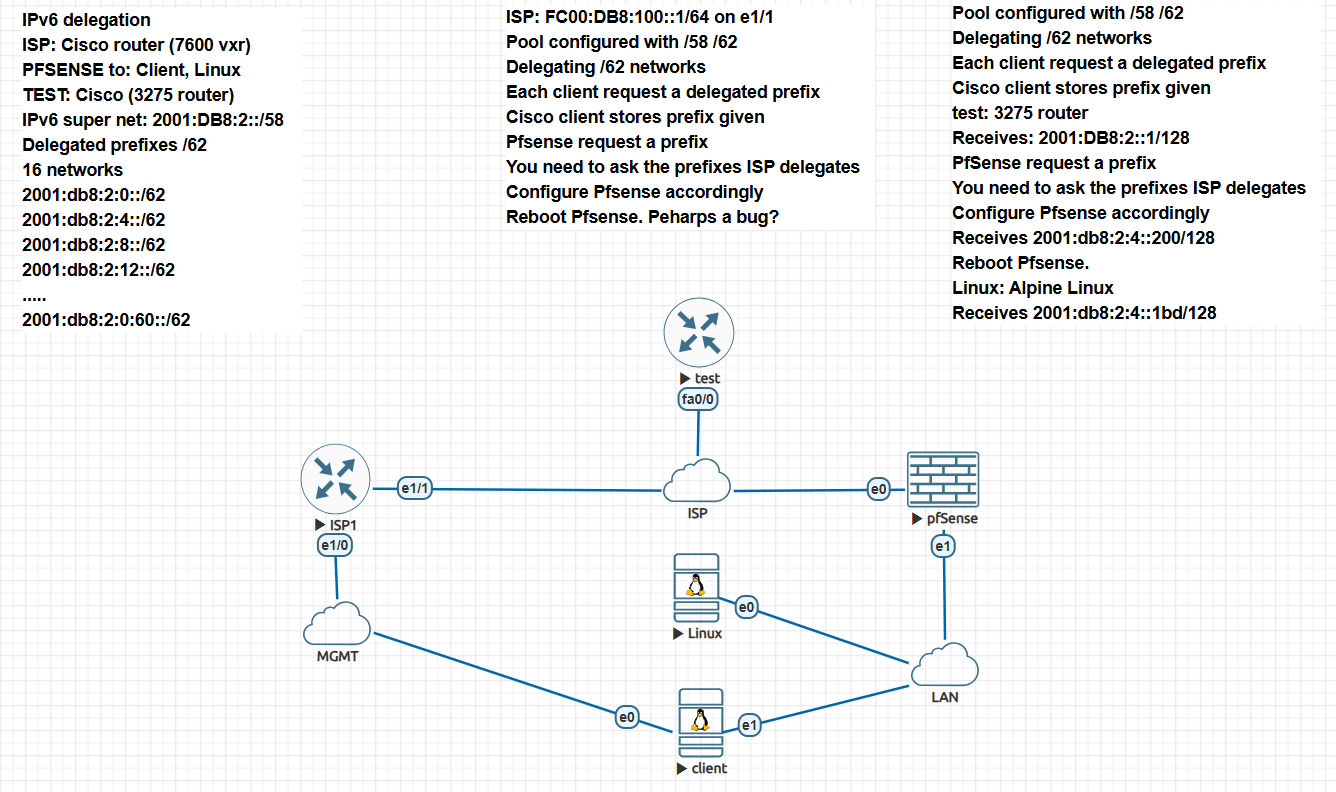
Figure 1. Delegation Diagram.
- It has a Cisco 7600 acting as the ISP router. It will delegate IPv6 prefixes.
- A Cisco router (test) that receives a prefix and then gets configured.
- A PfSense router (second client) that also gets a prefix and gets configured.
- A couple of devices to test what addresses Pf Sense gives.
IPv6 Delegation
First we need some background on how delegation works since every time that I see issues on forums, people do not seem to understand how IPv6 works, how routing works and how delegation is used.
- Delegation of prefixes is done by a DHCPv6 server. If you are an ISP you have a device in the network that receives requests and handles the prefixes needed.
- DHCPv6 does not handle routing information, I repeat it does not provides the default route needed.
- That is the job of a RADVD server which needs access to as many network segments you may have to correctly configure IPv6 addresses.
- Above is crucial, RADVD will only handle routes. Using SLAAC an interface will auto configure itself using an fe80 address (these are link-local addresses).
- I am simplifying things quit a bit, the point is that the RADVD has an interface that the client also sees via NDP and has a link-local address that can be ping by other devices on that segment only.
- That is the reason RADVD servers are usually on routers or L2/L3 switches that will have access to as many segments networks via interfaces or VLANS.
- A DHCPv6 server on the other hand can reside on a particular segment and be accessed using a relay (like you do with IPv4).
- Another point is that the WAN interface does not necessarily needs a global address, instead every ISP will use unique local address (ULC) or link local addresses for communications.
- The UCL space is fec0::/7. By its definition this prefix is not routable on the Internet (like 10.0.0.0/8 on IPv4).
- Thus, your WAN interface gets a UCL, or some ISPs will just use the link-local address. This is perfectly find, if you can access the shell of you router you will notice that the default route is via a link-local address.
- So, you request a prefix from your ISP, the RADVD server gets the request, sends routing information then it notifies the client to use a DHCPv6 server to get any other information it needs. This will include, a prefix, DNS information and any other stuff that a DHCP server hands out.
- You then need to choose a /64 network from the delegated prefix and configure your LAN interface (or let the device do it automatically by some means).
- Finally configure DHCPv6 (or not) on your other LAN interfaces and give additional IPv6 /64 prefixes if any.
As you can see it is straight forward somehow though, this trips a lot of users, and this makes sense in a way, a lot of consumers are not IT literate.
However, I see it also trips a lot of guys that know a bit more about networking go figure.
Ipv6 Addressing
We need to understand IPv6 addressing since if you do not, the lab will not work correctly. I will go over very quickly please read more comprehensive documentation.
- By design, you do not get an network smaller than a /64, from an ISP provider. This does not mean you could not use a /65 or a /66 on your local network.
- But if you do you it will break stateless autoconfiguration (SLAAC).
- Obviously if your are configuring routers, which by their definition need static routes, you can subnet your network. You will never use a RADVD or DHCPv6 server on those segments. This is a very special case.
Thus your ISP will give you a prefix smaller or equal than /64. For our purpose we will assume that we have the following global addresses assgined to the segment in question, 2001:DB8:2::/58. This super net now is capable of being
subnetted.
In our case we have decided to give clients a /62 prefix. A /62 is four networks (to keep it simple and recognize right away what prefix we got), and we will have 16 such networks to give.
A quick calculation should convince you, 62-58=4, 2^4 is 16, the number of networks available.
So the following is a list of all the available networks:
2001:db8:2:0::/62
2001:db8:2:4::/62
2001:db8:2:8::/62
2001:db8:2:12::/62
2001:db8:2:16::/62
2001:db8:2:20::/62
2001:db8:2:24::/62
2001:db8:2:28::/62
2001:db8:2:32::/62
2001:db8:2:36::/62
2001:db8:2:40::/62
2001:db8:2:44::/62
2001:db8:2:48::/62
2001:db8:2:52::/62
2001:db8:2:56::/62
2001:db8:2:60::/62
Another point to make is that the prefixes above are first come first serve. Thus you may get a different prefix after you reboot. This makes sense unless you talk to your ISP so he can reserve a prefix based on the UUID of your device.
Every device is different on how you find it, and the technical term is actually IAID (Identity Association Identifier) or DUID (DHCP Unique Identifier).
In either case it is assigned to the device which prevents it to change, unlike if it only was based on the interface, in that case there is a chance it may change.
An ISP may or may not honor this, (if you have a business account they should since your servers will need to be registered with a DNS provider somewhere and the FQDN needs to be the same across reboots, meaning the IPv6 address).
Now that we have an idea how IPv6 addresses and delegation works, we can proceed to configured the router that will give routing information and delegate prefixes.
Configurations
We will start with the Cisco 7200. Configuration may vary and will be probably different on newer routers.
Cisco 7200
I will not go over the whole configuration of the router, you can Google it. The relevant parts are shown.
ip domain name isp.com
ip name-server x.x.x.x
! Your DNS resolver
ip cef
ipv6 unicast-routing
! So Ipv6 will work
ipv6 cef
ipv6 dhcp pool MY_DHCPV6_POOL
! Declare the pool name
prefix-delegation pool CUSTOMER-PD-POOL
! Declare the delegation pool
domain-name example.com

interface Ethernet1/0
! Management IP access to outside if you need to access the router
ip address dhcp
! Self explanatory
ip nat outside
! So I can access the Internet and mimic it on the
! clients for IPv4 if I need to
ip virtual-reassembly in
duplex half
! This should be full of course
! for the lab it does not matter
!
interface Ethernet1/1
ip address 172.16.1.1 255.255.255.0
ip nat inside ! For IPv4 Clients inside  I
ip virtual-reassembly in
duplex half
ipv6 address FC00:DB8:100::1/64
! Usind UCL address
ipv6 dhcp server MY_DHCPV6_POOL
! Declaring the pool to use for DHCPv6

ip nat inside source list 1 interface Ethernet1/0 overload
! For completeness
!
access-list 1 permit 172.16.1.0 0.0.0.255
ipv6 local pool CUSTOMER-PD-POOL 2001:DB8:2::/58 62
! The actual prefix, /58 carved into /62 networks
!
That is it! Fairly straight forward.
However we need to look a little bit deeper. Clever readers and I know you are will have noticed that I did not configure “nd” flags.
On a cisco router the “ipv6 nd” command under an interface is the equivalent of configuring RADVD.
As you see we did not tell the router to do anything, if you typed the following command:
isp1#sh ipv6 interface ethe 1/1 prefix
IPv6 Prefix Advertisements Ethernet1/1
Codes for 1st column:
       A - Address, P - Prefix-Advertisement, O - Pool
       U - Per-user prefix
Codes for 2nd column and above:
       D - Default
       N - Not advertised, C - Calendar

PD default [LA] Valid lifetime 2592000, preferred lifetime 604800
AD FC00:DB8:100::/64 [LA] Valid lifetime 2592000, preferred lifetime 604800
And:
isp1#sh ipv6 interface ethe 1/1
Ethernet1/1 is up, line protocol is up
  IPv6 is enabled, link-local address is FE80::C801:ABFF:FED7:1D
  No Virtual link-local address(es):
  Global unicast address(es):
    FC00:DB8:100::1, subnet is FC00:DB8:100::/64
  Joined group address(es):
    FF02::1
    FF02::2
    FF02::1:2
    FF02::1:FF00:1
    FF02::1:FFD7:1D
    FF05::1:3
  MTU is 1500 bytes
  ICMP error messages limited to one every 100 milliseconds
  ICMP redirects are enabled
  ICMP unreachables are sent
  Input features: Common Flow Table Stile classification
  Output features: Common Flow Table Stile Classification
  ND DAD is enabled, number of DAD attempts: 1
  ND reachable time is 30000 milliseconds (using 30000)
  ND advertised reachable time is 0 (unspecified)
  ND advertised retransmit interval is 0 (unspecified)
  ND router advertisements are sent every 200 seconds
  ND router advertisements live for 1800 seconds
  ND advertised default router preference is Medium
  Hosts use stateless autoconfig for addresses.
The relevant info is in the middle. It is by default doing ND advertisements every 200 seconds to any client that request it.
Thus, clients will received a default route and a UCL prefix as you will see next.
When will you configure ND settings, if you are using another DHCPv6 server to handle addresses, then the router is acting a a relay, then you need to tell clients to redirect their requests to obtain what they need besides a default route only.
Cisco 3275
This is a 3275 (not a 3250 as I thought same diff).
The relevant bits are:
ipv6 unicast-routing
 interface FastEthernet0/0
  no ip address
  duplex auto
  speed auto
  ipv6 address autoconfig default
  ipv6 enable
  ipv6 dhcp client pd WAN-PREFIX
 !
 interface FastEthernet0/1
  no ip address
  duplex auto
  speed auto
  ipv6 address WAN-PREFIX ::1/64
  ipv6 enable
Interface 0/0, auto configures itself. Then we request a delegate prefix and we put it into the string ”WAN Prefix”.
Then Interface 0/1 uses that prefix, we tell to configure an IPv6 address. It will configure IPv6 addresses in order, in this case it start with the first /64 given and so on.
If you check the IPv6 address given you will see:
test#sh ipv6 int br
FastEthernet0/0            [up/up]
    FE80::C004:FDFF:FE28:0
    FC00:DB8:100:0:C004:FDFF:FE28:0
FastEthernet0/1            [up/up]
    FE80::C004:FDFF:FE28:1
    2001:DB8:2::1
As you can see, interface 0/0 received a UCL address plus a link local address. Interface 0/1 configured itself using the first prefix delegated.
Remember if you have x::1/64, it means it is actualy x:0::1/64 since when there are zeros the notation is condensed.
Finally do a show ipv6 route:
test#sh ipv6 route
IPv6 Routing Table - 7 entries
Codes: C - Connected, L - Local, S - Static, R - RIP, B - BGP
       U - Per-user Static route, M - MIPv6
       I1 - ISIS L1, I2 - ISIS L2, IA - ISIS interarea, IS - ISIS summary
       O - OSPF intra, OI - OSPF inter, OE1 - OSPF ext 1, OE2 - OSPF ext 2
       ON1 - OSPF NSSA ext 1, ON2 - OSPF NSSA ext 2
       D - EIGRP, EX - EIGRP external
S   ::/0 [1/0]
     via FE80::C801:ABFF:FED7:1D, FastEthernet0/0
S   2001:DB8:2::/62 [1/0]
     via ::, Null0
C   2001:DB8:2::/64 [0/0]
     via ::, FastEthernet0/1
L   2001:DB8:2::1/128 [0/0]
     via ::, FastEthernet0/1
C   FC00:DB8:100::/64 [0/0]
     via ::, FastEthernet0/0
L   FC00:DB8:100:0:C004:FDFF:FE28:0/128 [0/0]
     via ::, FastEthernet0/0
L   FF00::/8 [0/0]
     via ::, Null0
As you can see, you have:
- A default route via the 7200 link local address.
- A connected route using the UCL address.
- A static address configured automatically for the /62 via the :: and Null0. This is a normal Cisco way of having the /62 in the routing table.
Notice I did not request an IPv4 address, you could.
As you noticed the only thing we needed, was to declare the pool to store the delegated prefix and a general way of assigning /64 to whatever interfaces on the LAN.
I was expecting something similar on the PfSense. It does it at the end but it was not clear how to go about it even after reading PfSense own documentation.
PfSense
I am running 2.6.0-RELEASE, which may be a bit old however the behavior should be same.
Let’s look at the finished result before we go deeper.
If we look at vtnet0 (wan interface)
2.6.0-RELEASE][admin@pfSense.example.com]/root: ifconfig vtnet0
vtnet0: flags=8843<UP,BROADCAST,RUNNING,SIMPLEX,MULTICAST> metric 0 mtu 1500
description: WAN
options=800b8<VLAN_MTU,VLAN_HWTAGGING,JUMBO_MTU,VLAN_HWCSUM,LINKSTAT
ether 50:01:00:02:00:00 inet6 fe80::5201:ff:fe02:0%vtnet0 prefixlen 64 scopeid 0x1 inet6 fc00:db8:100:0:5201:ff:fe02:0 prefixlen 64 autoconf  inet 172.16.1.10 netmask 0xffffff00 broadcast 172.16.1.255 media: Ethernet 10Gbase-T
status: active
nd6 options=23<PERFORMNUD,ACCEPT_RTADV,AUTO_LINKLOCAL>
Notice we have a local link address and also got a UCL address plus in this case I requested also an IPv4 address (acting as our IPv4 from the ISP).
If you issue: netstat -6 -rWh, you see:
Internet6:
Destination        Gateway            Flags       Use    Mtu    Netif Expire
default            fe80::c801:abff:fed7:1d%vtnet0 UGS      362   1500   vtnet0
localhost          link#6             UH            0  16384      lo0
2001:db8:2:4::/64  link#2             U            13   1500   vtnet1
pfSense            link#2             UHS           0  16384      lo0
fc00:db8:100::/64  link#1             U             8   1500   vtnet0
fc00:db8:100:0:5201:ff:fe02:0 link#1  UHS           0  16384      lo0
fe80::%vtnet0/64   link#1             U        358893   1500   vtnet0
fe80::5201:ff:fe02:0%vtnet0 link#1    UHS           0  16384      lo0
fe80::%vtnet1/64   link#2             U           318   1500   vtnet1
fe80::1:1%vtnet1   link#2             UHS           0  16384      lo0
fe80::5201:ff:fe02:1%vtnet1 link#2    UHS           0  16384      lo0
fe80::%vtnet2/64   link#3             U             0   1500   vtnet2
fe80::5201:ff:fe02:2%vtnet2 link#3    UHS           0  16384      lo0
fe80::%lo0/64      link#6             U             0  16384      lo0
fe80::1%lo0        link#6             UHS           0  16384      lo0
The relevant info here is the default destination, as you can see it points to the ISP router.
On vtnet1 you will see if you issue “ifconfig vtnet1” using a shell.
vtnet1: flags=8843<UP,BROADCAST,RUNNING,SIMPLEX,MULTICAST> metric 0 mtu 1500
description: LAN
options=800b8<VLAN_MTU,VLAN_HWTAGGING,JUMBO_MTU,VLAN_HWCSUM,LINKSTATE>
ether 50:01:00:02:00:01
inet6 fe80::5201:ff:fe02:1%vtnet1 prefixlen 64 scopeid 0x22
inet6 fe80::1:1%vtnet1 prefixlen 64 scopeid 0x2
inet6 2001:db8:2:4:5201:ff:fe02:1 prefixlen 64
inet 192.168.100.1 netmask 0xffffff00 broadcast 192.168.100.255
media: Ethernet 10Gbase-T <full-duplex>
status: active
nd6 options=21<PERFORMNUD,AUTO_LINKLOCAL>
Notice that PfSense did acquire an IPv6 address “2001:db8:2:4:5201:ff:fe02:1”, this is the address that will automatically be configured after you get the settings for the PfSense correct.
On your client, you will see that if you configured the DHCPv6 on PfSense you will get an IPv6 address. In our case I configured it to assign addresses in the following range: ::100 to ::200, where if things are done correctly it will prepend the LAN interface prefix.
So in my case the IP the client got was: 2001:db8:2:4::200, notice that in this case if you remember I got the prefix 2001:db8:2:4::/62 which is the next prefix available and it configure the LAN interface accordingly using a /64.
I will try to explain the pitfalls I encountered and how finally got it work correctly.
Troubleshooting Delegation PfSense
I was confused on how to request a prefix. I was not clear from the GUI and event after going to the “horse’s mouth”, Pfsense documentation, it was not working until I re-booted the PfSense. Rather than show sreen-shots I will go old school.
This is what you do:
- On the interfaces page, select the WAN interface.
- Enable it.
- Ipv6 Configuration should be DHCP6
- Under “DHCP 6 Client Configuration”
- Select “Request only an IPv6 prefix, do not request an IPv6 address”
- Here is the tricky part, some ISPs may give you a hint, however “you need to call your ISP and ask what is the prefix they are delegating to you”, otherwise PfSense will not accept the delegation.
- Go to Intefaces again and choose LAN
- Enable it (of course).
- On “Ipv6 Configuration Type”, select “Track Interface”.
- Scroll down and under “Track IPv6 Interface”, select “WAN”. This tells PfSense to obtain a delegated prefix via WAN but use it for the LAN interface.
- For Ipv6 Prefix ID keep as the default 0, this will use the prefixes as delegated starting in order 1st, 2nd , etc…
- Go to “Services” and choose “DHCPv6 Server & RA”
- Enable DHCPv6 for the interfaces in the LAN you want to use.
- You should see the actual prefix delegated to the particular LAN interface. It will show after a reboot.
- Choose the range, since it obtained a prefix you just need to enter the range ::100 to ::200 for example.
- Go to “Router Advertisements”
- For “Router Mode”, select “Managed – RA Flags {managed, other stateful],Prefix….”
- You can actually look for more information by clicking on the “i” icon.
Save the configuration.
Now you would think that after this your client will acquire an IP.
Not so fast.
After a lot of digging including tcpdump and seen the DHCLIENT on the PfSense requesting but not obtaining a prefix, as a last resort I rebooted the PfSense.
And what do you know, it now works.
This should not be the case, as I mentioned PfSense is actually Linux underneath.
It uses the WIDE-DHCPv6 (dhcp6c) client, this type of client will (using the correct cli switches) give you the prefix the ISP is giving you and you can then store it in a variable. I have done this multiple types (in Fedora for example and then under Ubuntu), on those cases the distros use the standard “dhclient”.
However, the behavior should be the same. Of course perhaps I was expecting a bit too much.
A reboot as stated did fix it. I have not looked to see the output on the CLI of the PfSense or the logs to see what is now getting in terms of prefixes.
Obviously it is getting the correct ones. Also I am using an old PfSense version perhaps newer versions behaves better.
You should familiarized with IPv6 as it is done on the PfSense, look at other settings in particular under ‘Diagnostic”, check the “NDP Table” for example, it will give you instructive output.
Finally as an after thought I decided to add an Alpine Linux server. Other than you need to do a couple of extra things to have IPv6 to work, it acquired an IPv6 address with no problem.
I will also make a comment, I was expecting PfSense to allow configuration of your LAN as you did with the DHCP ranges.
In this fashion you have more control and give the LAN an IP of ::1, like Cisco does. You can configure this manually, but if the ISP does not honor the AIAD, you will have to manually reconfigured.
That in my opinion defeats the purpose of receiving prefixes automatically. Just a thought.
Conclusions
Not as straight forward as I thought. Nevertheless, it works.
Now if your ISP is only giving you a /64, I can hear all the rants that it should be giving you at least a /56 (a lot I will say, are we spoiled?).
There are ways around that if you only get a /64 and you need VLANS and Wi-Fi, etc.
Perhaps a topic for a future blog.
There you have it.
Ciao.