
Hello there,
A while back, in a galaxy far away, I had a blog (and related posts) about using the ISC DHCP server.
That setup worked very well. However, the ISC DHCP server has been discontinued.
So it was time to try the Kea DHCP server.
It should be a standard setup, Kea is a modern replacement however, I run into a few quirks and it did not help that I was using the latest Ubuntu server version 26.
So keep on reading.
Motivation
The motivation is to have a server offer IPv4 and IPv6 addresses. In addition since IPv6 needs a RADVD server to operate, normally you will use a router perhaps your main L2/L3 device in an enterprise or just use a consumer Wi-Fi router that has the capability to act as a relay.
Finally, use DDNS so we can dynamically add clients to Bind.
The reason is simple, you will not be able to remember the IPv6 addresses of servers like IPv4.
In this fashion you have in my opinion more fine control of your DHCP server.
Setup
The figure below shows the setup.
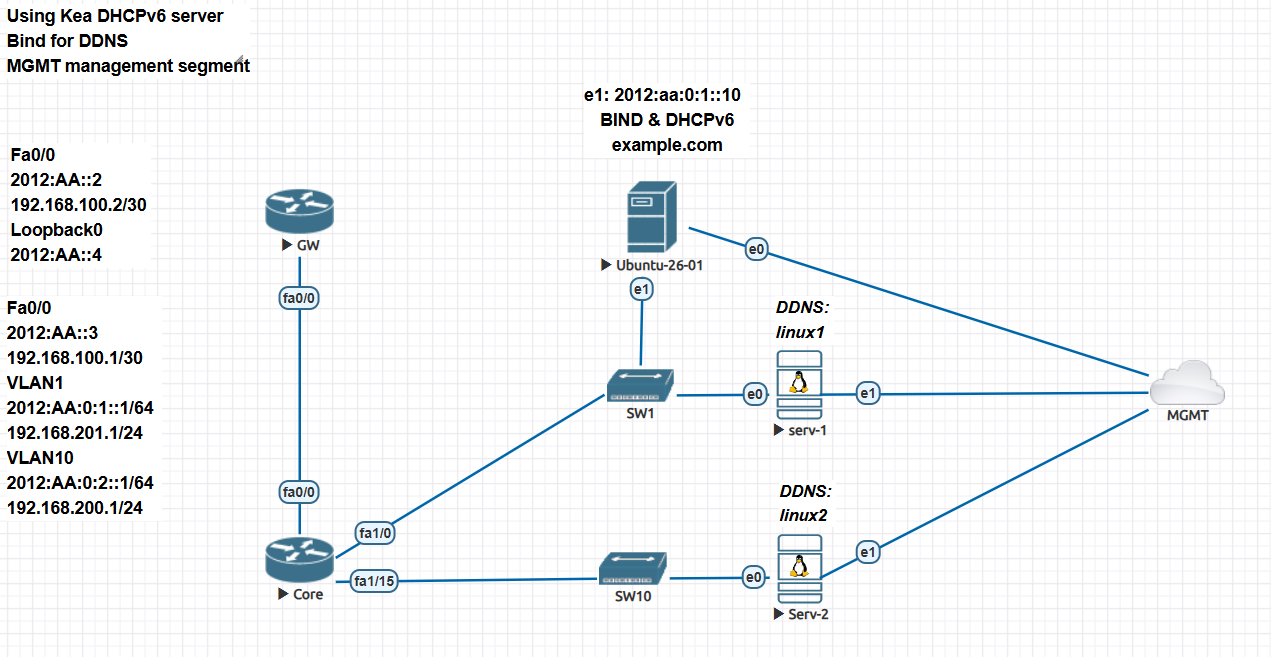
You will need:
A couple of routers. GW is a standard Cisco router. Core is a L2/L3 Cisco switch in this fashion I can create VLANs to segment the networks.
A Linux server, I decided to install the latest Ubuntu 26 server just to find out if there are differences (since it is supposed to use rust!).
A couple of clients, in this case Linux servers. Should not be an issue however, I run into some quirks here which surprised me.
Configurations
Cisco
The configurations for the Cisco devices are basically the same as before. Follow the linked blog and review the network diagram and you should have not issues.
The important tidbit is the IPv6 interface configuration since you need RA advertisements but send the client to to Kea for DHCP information.
ipv6 unicast-routing

Core#sh run int vlan 1
!
interface Vlan1
 ip address 192.168.201.1 255.255.255.0
 ip helper-address 192.168.201.10
 ipv6 address 2012:AA:0:1::1/64
 ipv6 enable
 ipv6 nd prefix 2012:AA:0:1::/64 no-advertise
 ipv6 nd managed-config-flag
end

Core#sh run int vlan 10
!
interface Vlan10
 ip address 192.168.200.1 255.255.255.0
 ip helper-address 192.168.201.10
 ipv6 address 2012:AA:0:2::1/64
 ipv6 enable
 ipv6 nd prefix 2012:AA:0:2::/64 no-advertise
 ipv6 nd managed-config-flag
 ipv6 dhcp relay destination 2012:AA:0:1::10 Vlan1
end
A quick description of what this configuration is doing:
- Enable ipv6 unicast routing.
- Allow RA announcements but disable network advertisements.
- Allow devices to receive a default route. Unlike DHCPv4, DHCPv6 will not do this
- The router redirects the clients to obtain anything it needs from DHCPv6.
- Vlan 10 is in a network not directly connected to the DHCP server thus tell clients to use the DHCP server.
- The connection for the second segment should be done via vlan 10.
- We are using DHCPv4 also so tell clients the IPv4 of the DHCP server to use.
- This also implies that there is IP connectivity to the DHCP server (via IPv4 and IPv6). You need to make sure of this!
DHCP Server
I decided to use Ubuntu 26 for the server. It uses Rust for most of the core utilities, I wanted to see how it would performed.
After installation we need to install the Kea dhcp modules for IPv4 and IPv6. In addition we will need to install the Kea DHCP-DDNS package.
This was part of the old ISC. Install Bind9 and for troubleshooting install TCPDUMP, and make sure the DHCLIENT utility is also installed. In the case of Ubuntu it should be since Netplan uses it to obtain IP addresses.
Configured Netplan so it gives static IPv4 and IPv6 according to the network diagram. This is a good time to check connectivity with the core router. If you have connectivity is time to configure Kea.
KEA
We will start with the DHCPv6 configuration. The reason is that unlike IPv4, it has some quirks unlike the IPv6 configuration.
The configuration is below:
root@test-ubuntu-26-01:~# cat /etc/kea/kea-dhcp6.conf

{
// DHCPv6 configuration starts here. This section will be read by DHCPv6 server
// and will be ignored by other components.
"Dhcp6": {
    // Add names of your network interfaces to listen on.
    "interfaces-config": {
        "interfaces": [ "ens4/2012:aa:0:1::10" ]
    },

    "control-socket": {
        "socket-type": "unix",
        "socket-name": "kea6-ctrl-socket"
    },

    "lease-database": {
        // Memfile is the simplest and easiest backend to use. It's an in-memory
        // C++ database that stores its state in CSV file.
        "type": "memfile",
        "lfc-interval": 3600
    },

    "expired-leases-processing": {
        "reclaim-timer-wait-time": 10,
        "flush-reclaimed-timer-wait-time": 25,
        "hold-reclaimed-time": 3600,
        "max-reclaim-leases": 100,
        "max-reclaim-time": 250,
        "unwarned-reclaim-cycles": 5
    },

    "renew-timer": 1000,
    "preferred-lifetime": 3000,
    "valid-lifetime": 4000,

    "option-data": [
         {
             "name": "dns-servers",
             "code": 23,
             "csv-format": true,
             "space": "dhcp6",
             "data": "2012:aa:0:1::10"
         }
    ],

    "subnet6": [
        {
            "id": 1,
            "subnet": "2012:aa:0:1::/64",
            "interface": "ens4",
            "pools": [ { "pool": "2012:aa:0:1::1000 - 2012:aa:0:1::2000" } ]
        },
        {
            "id": 2,
            "subnet": "2012:aa:0:2::/64",
            "interface": "ens4",
            "relay": {
                "ip-addresses": [ "2012:aa:0:1::1" ]
            },
            "pools": [ { "pool": "2012:aa:0:2::1000 - 2012:aa:0:2::2000" } ]
        }
    ],

    // DDNS information (how the DHCPv6 component can reach a DDNS daemon)

    "dhcp-ddns": {
      "enable-updates": true,
      "server-ip": "127.0.0.1",
      "server-port": 53001,
    },

      "ddns-qualifying-suffix": "example.com",
      "ddns-replace-client-name": "never",
      "ddns-update-on-renew": true,
      "ddns-conflict-resolution-mode": "no-check-without-dhcid",
      //"ddns-generated-prefix": "host",

    "loggers": [
    {
        "name": "kea-dhcp6",
        "output-options": [
            {
                "output": "stdout",
                "pattern": "%-5p %m\n"
            }
        ],
        // This specifies the severity of log messages to keep. Supported values
        // are: FATAL, ERROR, WARN, INFO, DEBUG
        "severity": "INFO",

        // If DEBUG level is specified, this value is used. 0 is least verbose,
        // 99 is most verbose. Be cautious, Kea can generate lots and lots
        // of logs if told to do so.
        "debuglevel": 0
    }
    ]
}
}
A few things to point out:
“interfaces”: [“ens4/2012:aa:0:1::10”], follow this format it will save
you countless grief an hours of troubleshooting.IPv6 relaying uses unicast connections.
Each subnet definition should also declare the interface in use.
For networks not with direct connectivity to the DHCP server, you also need to tell the server the IPv6 of the relay client.
The “relay” command does this. It uses the “interface/IPv6” command configured to connect via unicast, otherwise it will try using multicasting and it will fail.
- The DDNS commands are also shown.
Use your own IPv6 prefixes, the ones I used are for demonstration purposes!
Before attempting getting an IPv6 address, you should test your configuration.
Issue the following:
kea-dhcp6 -t /etc/kea/kea-dhcp6.conf
If you do not see any errors, you are fine. If you do correct them, the test will tell you the line and place to look.
Here I got the first issue with Ubuntu 26. The installation did create an “apparmor” profile. When I did try above it threw an error, even though the original file will allow the service to start without issues.
In order to fix this, you need to use “aa-genprof” to generate a new profile. After some trial and error attempts I got it. However I encountered the same issue with the IPv4 Kea part and also for the DDNS service. So I disabled “apparmor” for those two, I know in
a production system you should fix it. This is a lab so sue me!
The DHCPv4 is similar, click on the link and you will see the whole configuration for it.
The DDNS configuration is below:
{
"DhcpDdns":
{
  "ip-address": "127.0.0.1",
  "port": 53001,
  "control-socket": {
      "socket-type": "unix",
      "socket-name": "/run/kea/kea-ddns-ctrl-socket"
  },

  <?include "/etc/kea/tsig-keys.json"?>

  "forward-ddns" : {
      "ddns-domains" : [
          {
               "name": "example.com.",
               "key-name": "dhcp1-ns1",
               "dns-servers": [
                   { "ip-address": "2012:aa:0:1::10" }
               ]
          }
      ]
  },

  "reverse-ddns" : {
      "ddns-domains" : [
          {
               "name": "1.0.0.0.0.0.0.0.a.a.0.0.2.1.0.2.ip6.arpa.",
               "key-name": "dhcp1-ns1",
               "dns-servers": [
                   { "ip-address": "2012:aa:0:1::10" }
               ]
          },
          {
               "name": "201.168.192.in-addr.arpa.",
               "key-name": "dhcp1-ns1",
               "dns-servers": [
                   { "ip-address": "2012:aa:0:1::10" }
               ]
          },
          {
               "name": "200.168.192.in-addr.arpa.",
               "key-name": "dhcp1-ns1",
               "dns-servers": [
                   { "ip-address": "2012:aa:0:1::10" }
               ]
          },
          {
               "name": "2.0.0.0.0.0.0.0.a.a.0.0.2.1.0.2.ip6.arpa.",
               "key-name": "dhcp1-ns1",
               "dns-servers": [
                   { "ip-address": "2012:aa:0:1::10" }
               ]
          }
      ]
  },

  "loggers": [
    {
        "name": "kea-dhcp-ddns",
        "output_options": [
            {
                "output": "stdout",
                "pattern": "%-5p %m\n"
            }
        ],
        "severity": "INFO",
        "debuglevel": 0
    }
  ]
}
}
This is fairly straight forward, you need to declare the bind zones for which you are going to use DDNS.
Notice that I am also declaring IPv4 zones but the IP address of the server to do updates is the IPv6 and not the IPv4 of the server. This is not an issue the server will use “nsupdate” to update the server, what IP is uses to do so is irrelevant as long as it finds the correct zone to update.
Finally you need to create the zones for bind. I will not go over this, it is is fairly standard.
One issue according to this blog is the ability to modifying files. Follow those instruction and you will be set.
You should now be ready. Or maybe. Keep on reading.
Issues and troubleshooting
DHCPv6
I thought that dispensing address and writng DDNS entries was going to be easy. Not quite.
Initially the device on the same segment as the server was getting IPv6 addresses, the device using the relay was not.
Netplan was refusing in obtaining an IPv6 address. Do not know why so I decided to install if it was not the “dhclient” app.
This will come back to bite in some other fashion. After requesting a dhcpv6 address once again did not work for the second segment.
This is when I decided to install the KEA dhcpv4 server. It worked, both devices were getting IPv4 address. Then did a TCPDUMP for DHCPv6 packets, I noticed something interesting, the server was trying to communicate back using IPv6 ICMP but failing and also attempting connections on port 547 on the Cisco relay through the local link addresses, this is standard behavior.
Then it hit me, it was acting as if the relay for the second segment was on the same subnet and failing.
Went back to the docs and found that you should use the interface plus the IPv6 address so the server uses unicast connections to negotiate with the relay.
It started to work.
DDNS
With DHCP working it was time to see if DDNS was also working. Well I decided to keep using the DHCLIENT to obtain IP addresses and this would obfuscate the issue.
The server was adding “my-host” and appending the ipv6 address. It did not help that I was also sometimes not able to write because of the DDNS conflict resolution directives.
Try several things and then realize that it was perhaps the DHCLIENT not properly sending the HOSTNAME. Force the DHCLIENT to do so and was not working thus decided to go back to basics and settle on the following configuration.
      "ddns-qualifying-suffix": "example.com",
      "ddns-replace-client-name": "never",
      "ddns-update-on-renew": true,
      "ddns-conflict-resolution-mode": "no-check-without-dhcid",
      //"ddns-generated-prefix": "host",
The “never” key tells the server to change if it gets an hostname otherwise do nothing. Do updates every time an IP is requested, on a production system you do not want this, it will put a strain on the server if you have thousands of requests.
The “no-check-wihtout-dhcid” should be use carefully also. Then decided to use the “netplan try” command and what do you know it worked. Netplan is sending the correct hostname. This is confusing because “netplan” will use in the background either the “dhclient” or a variant of it, or so I thought.
Alma linux for example does not install “dhclient” by default however, it is capable of requesting DHCP addresses natively via Network Manager if you use it.
Installed Alma linux on the second server and restarted the Network Manager and it also worked fine.
So now I have Kea nd DDNS working correctly.
One more thing double check you syntax, I missed an “a” in the naming of the reverse “in-addr.arpa” file, spent too much time figuring it out since DHCPv4 would not write DDNS, and DHCPv4 was supposed to be the easy part. Go figure.
One final note, if you look carefully the DHCPv4 configuration I use does not declare a default route. The reason is that the default route is being obtained via the MGMT segment and allowing access to the Internet for updates.
Conclusions
Well perhaps some of the issues I encountered were self-inflicted, in any case DDNS for IPv6 is working. You need to have DDNS for IPv6, you are not going to remember the actual IPv6 addresses but you can always remember the FQDN given.
Ciao.