
Hello, there.
This blog is a follow up to my previous blog.
I decided to make it a bit more realistic. So I added another IOS router for redundancy and also use a route reflector for BGP.
Let’s go.
Motivation
In a previous blog I had a very simple SRV6 setup. Functional but not quite what you would setup in a real situation. Thus I decided to add another IOS router and use a route reflector, this makes the setup a bit more practical.
Setup
Figure 1. shows the new setup.
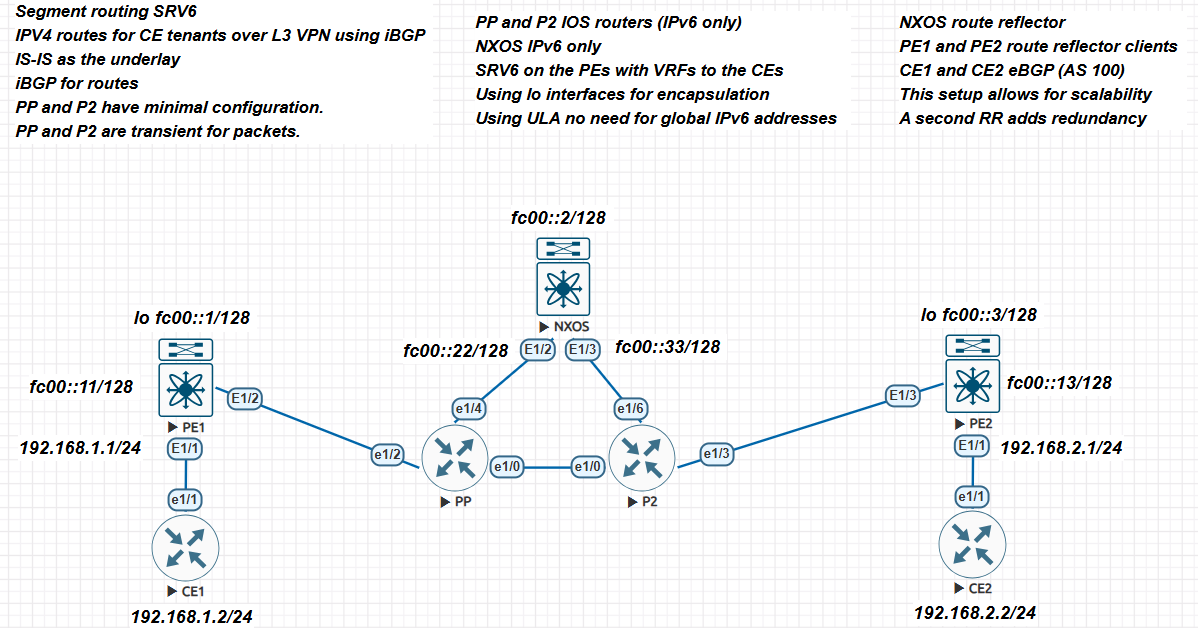
- NXOS is now the route reflector. In this fashion, your clients configure eBGP against it. You then configure peering accordingly.
- Added two IOS routers (7200). This to show that the data plane only needs IPv6 and nothing more.
- We peer to CE1 and CE2 via eBGP. In this fashion you can announce certain routes or a default route if needed.
Configurations
P routers
The PP and P2 routers just have IPv6 enabled and IS-IS enabled.
PP
interface Ethernet1/0
 no ip address
 duplex full
 ipv6 address FC00::100/128
 ipv6 router isis 1
 isis ipv6 tag 1
!
interface Ethernet1/2
 no ip address
 duplex full
 ipv6 address FC00::222/128
 ipv6 router isis 1
 isis ipv6 tag 1
!
interface Ethernet1/4
 no ip address
 duplex full
 ipv6 address FC00::444/128
 ipv6 router isis 1
 isis ipv6 tag 1
!
router isis 1
 net 49.0001.0000.0000.0004.00
 is-type level-2-only
 metric-style transition
!
P2
interface Ethernet1/0
 no ip address
 duplex full
 ipv6 address FC00::110/128
 ipv6 router isis 1
 isis ipv6 tag 1
!
interface Ethernet1/3
 no ip address
 duplex full
 ipv6 address FC00::333/128
 ipv6 router isis 1
 isis ipv6 tag 1
!
interface Ethernet1/6
 no ip address
 duplex full
 ipv6 address FC00::666/128
 ipv6 router isis 1
 isis ipv6 tag 1
!
router isis 1
 net 49.0001.0000.0000.0005.00
 is-type level-2-only
 metric-style transition
!
NXOS
NXOS in addition to IPv6 and IS-IS, is configured as a route reflector. I will not show IPv6 or IS-IS configuration but the BGP setup. We added a Lookback interface for peering.
router bgp 64512
 router-id 10.0.0.2
 address-family ipv4 unicast
 address-family vpnv4 unicast
 neighbor fc00::1
 remote-as 64512
 update-source loopback0
 address-family ipv4 unicast
 route-reflector-client
 address-family vpnv4 unicast
 send-community
 send-community extended
 route-reflector-client
 neighbor fc00::3
 remote-as 64512
 update-source loopback0
 address-family ipv4 unicast
 route-reflector-client
 address-family vpnv4 unicast
 send-community
 send-community extended
 route-reflector-client
We peer to the loopback interfaces of the CE routers, using the newly created loopback interface for updates. We also set the CE routers as route reflector clients.
PE1 and PE2
Here the configuration has not changed with the exception that we peer to the loopback interface of NXOs instead. In addition we now peer to the CE routers.
Below is the configuration for PE1, PE2 is the same change the corresponding IP address for peering.
router bgp 64512
 router-id 10.0.0.1
 segment-routing srv6
 locator mylocator
 alloc mode per-vrf
 address-family ipv4 unicast
 redistribute direct route-map EVERYTHING
 address-family vpnv4 unicast
 neighbor fc00::2
 remote-as 64512
 update-source loopback0
 address-family ipv4 unicast
 address-family vpnv4 unicast
 send-community
 send-community extended
 vrf one
 address-family ipv4 unicast
 redistribute direct route-map EVERYTHING
 segment-routing srv6
 alloc mode per-vrf
 address-family ipv6 unicast
 redistribute direct route-map EVERYTHING
 neighbor 192.168.1.2
 remote-as 100
 address-family ipv4 unicast
This is an eBGP peering, we use AS 100, also we use peering under the VRF ONE towards CE1.
CE1 and CE2
Here we now need to add eBGP peering to the PE routers. I will show the CE1 configuration, CE2 is the same with the appropriate IP addresses.
router bgp 100
 bgp log-neighbor-changes
 neighbor 192.168.1.1 remote-as 64512
 !
 address-family ipv4
 network 192.168.1.0
 neighbor 192.168.1.1 activate
 neighbor 192.168.1.1 soft-reconfiguration inbound
 exit-address-family
!
We also delete the default route we put in since we are now getting prefixes directly.
Verification
We should now see peering between the route reflector and the PE routers.
nxos-9k# sh bgp vpnv4 unicast summary
BGP summary information for VRF default, address family VPNv4 Unicast
BGP router identifier 10.0.0.2, local AS number 64512
BGP table version is 7, VPNv4 Unicast config peers 2, capable peers 2
2 network entries and 2 paths using 488 bytes of memory
BGP attribute entries [2/344], BGP AS path entries [0/0]
BGP community entries [0/0], BGP clusterlist entries [0/0]

Neighbor V AS MsgRcvd MsgSent TblVer InQ OutQ Up/Down State/PfxRcd
fc00::1 4 64512 1357 1360 7 0 0 22:26:53 1
fc00::3 4 64512 1355 1359 7 0 0 22:25:28 1
You can see that we are receiving prefixes for the VPNV4 unicast address family.
nxos-9k# sh ip bgp all
BGP routing table information for VRF default, address family VPNv4 Unicast
BGP table version is 7, Local Router ID is 10.0.0.2
Status: s-suppressed, x-deleted, S-stale, d-dampened, h-history, *-valid, >-best
Path type: i-internal, e-external, c-confed, l-local, a-aggregate, r-redist, I-injected
Origin codes: i - IGP, e - EGP, ? - incomplete, | - multipath, & - backup, 2 - best2

 Network Next Hop Metric LocPrf Weight Path
Route Distinguisher: 1:1
*>i192.168.1.0/24 fc00::1 0 100 0 ?
*>i192.168.2.0/24 fc00::3 0 100 0 ?
We are receiving both prefixes from the CE routers. The next hop is the loopback interfaces for each router (IPv6 if you notice!).
If we go to PE1, we will see:
pe1# sh bgp all summary
BGP summary information for VRF default, address family VPNv4 Unicast
BGP router identifier 10.0.0.1, local AS number 64512

BGP table version is 12, VPNv4 Unicast config peers 1, capable peers 1
2 network entries and 3 paths using 608 bytes of memory
BGP attribute entries [1/172], BGP AS path entries [0/0]
BGP community entries [0/0], BGP clusterlist entries [1/4]

Neighbor V AS MsgRcvd MsgSent TblVer InQ OutQ Up/Down State/PfxRcd
fc00::2 4 64512 1364 1361 12 0 0 22:32:38 1
We are peering with the route reflector.
pe1# sh ip bgp all
BGP routing table information for VRF default, address family IPv6 Unicast
BGP table version is 4, Local Router ID is 10.0.0.1
Status: s-suppressed, x-deleted, S-stale, d-dampened, h-history, *-valid, >-best
Path type: i-internal, e-external, c-confed, l-local, a-aggregate, r-redist, I-injected
Origin codes: i - IGP, e - EGP, ? - incomplete, | - multipath, & - backup, 2 - best2

 Network Next Hop Metric LocPrf Weight Path
*>lfc00:0:0:1::/64 0:: 100 32769 i

BGP routing table information for VRF default, address family VPNv4 Unicast
BGP table version is 12, Local Router ID is 10.0.0.1
Status: s-suppressed, x-deleted, S-stale, d-dampened, h-history, *-valid, >-best
Path type: i-internal, e-external, c-confed, l-local, a-aggregate, r-redist, I-injected
Origin codes: i - IGP, e - EGP, ? - incomplete, | - multipath, & - backup, 2 - best2

 Network Next Hop Metric LocPrf Weight Path
Route Distinguisher: 1:1 (VRF one)
*>r192.168.1.0/24 0.0.0.0 0 100 32768 ?
* e 192.168.1.2 0 0 100 i
*>i192.168.2.0/24 fc00:0:0:3:: 0 100 0 ?
We see information regarding the locator, in addition we see information of the prefixes CE1 and CE2 advertise, You will see the same information on CE2.
CE1 and CE2
ce1#sh ip bgp
BGP table version is 3, local router ID is 192.168.1.2
Status codes: s suppressed, d damped, h history, * valid, > best, i - internal,
 r RIB-failure, S Stale, m multipath, b backup-path, f RT-Filter,
 x best-external, a additional-path, c RIB-compressed,
Origin codes: i - IGP, e - EGP, ? - incomplete
RPKI validation codes: V valid, I invalid, N Not found

 Network Next Hop Metric LocPrf Weight Path
 * 192.168.1.0 192.168.1.1 0 0 64512 ?
 *> 0.0.0.0 0 32768 i
 *> 192.168.2.0 192.168.1.1 0 64512 ?
And here we see the prefix from CE2 in the BGP table. And of course you will be able to ping across. Same thing for CE2.
Conclusions
Above lab is a more realistic setup. You can add more routers in between your PE routers as long as they support IPv6. This will give you redundancy for your cloud.
You can also add a second router reflector also for redundancy.
There you have it.
Hope you enjoy this lab.
Ciao.